This repository was archived by the owner on Mar 3, 2023. It is now read-only.
Custom
- Do win+r then when a program called "run" pops up, type into it %APPDATA% this brings you to the area where apps store their data.
- Find a folder called EZServer6 and click on it.
It should look like this:
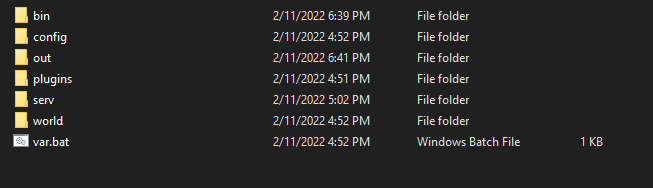
In the serv folder you can find the server files, to upload custom jar delete lol.jar place your jar then rename the jar to lol.jar
In the config folder you can find the config files, click on server.properties and choose notepad (or your select text editor) and you can change renderdistance, the port, the MOTD, and even the seed and level settings.