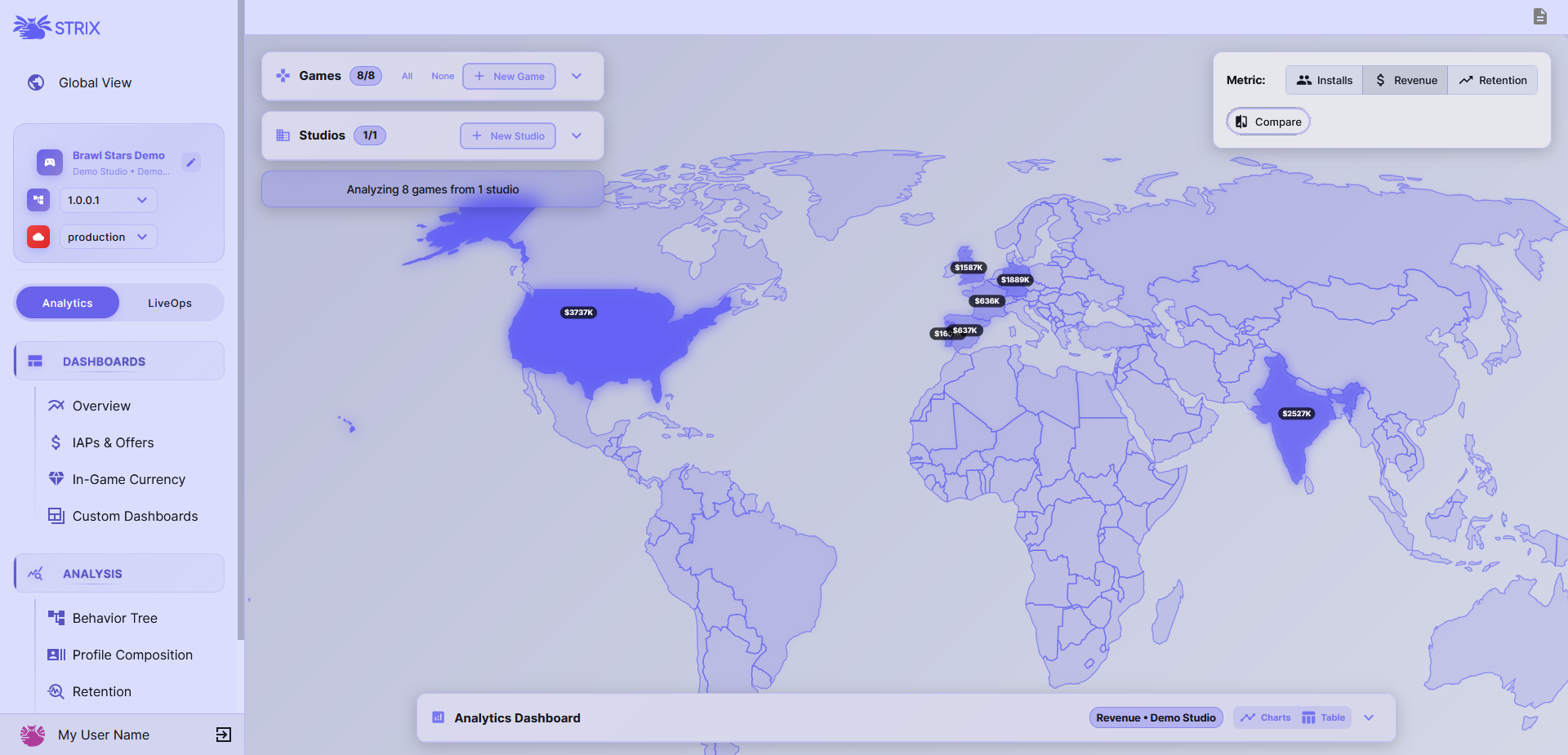
Strix GameOps is a high-load, microservices-based game operations platform that provides analytics, deployment management, geocoding, data ingestion and live services capabilities.
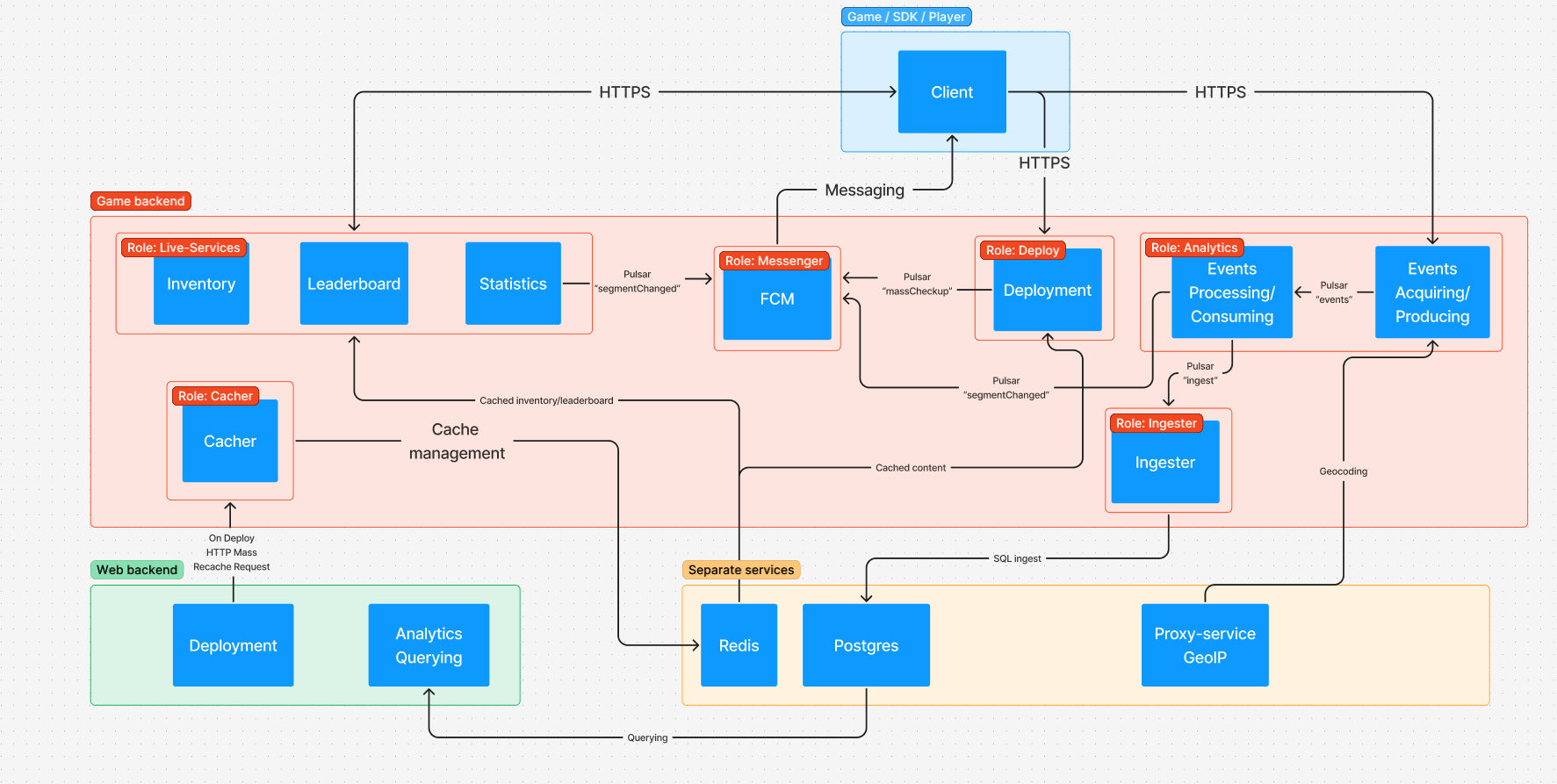
Strix was created to scale horizontally using Apache Pulsar, Docker and Kubernetes. The most loaded type of server is game-backend, which is a polymorph with different roles. The approximate and simplified system design can be seen down below. Though, scaling is not supported out-of-the-box by open-source community edition, it is done in Strix team's own setup.
- Docker: Version 20.10 or higher
- Docker Compose: Version 2.0 or higher
How to install Docker Desktop:
- Windows: https://docs.docker.com/desktop/setup/install/windows-install/
- Linux: https://docs.docker.com/desktop/setup/install/linux/
Minimum Requirements:
- RAM: 8GB (12GB+ recommended for production)
- CPU: 4 cores (8+ cores recommended)
- Storage: 20GB free space (SSD recommended)
- Network: Stable internet connection for configs downloads
Recommended Production Requirements:
- RAM: 16GB+
- CPU: 8+ cores
- Storage: 50GB+ SSD and S3 / Google Cloud Storage
- Network: High-speed connection
git clone https://github.com/strixgameops/strix-gameops.git
cd strix-gameopsThe system includes automated password generation scripts. You can run _generate_passwords and it will automatically generate passwords for all connections.
Generally, the way to go is:
For Linux/macOS:
chmod +x _generate_passwords.sh
./_generate_passwords.sh

chmod +x start.sh
./start.sh
For Windows:
.\_generate_passwords.bat
.\start.bat
These scripts will:
- Generate secure random passwords for all databases
- Create the passwords.txt file with all created passwords
- Set up initial configuration
Make sure to launch Docker daemon (or Docker Desktop.exe if you're on Windows), otherwise you won't be able to build containers and start them.
Make sure not to delete passwords.txt (you can just leave it empty, though) if you plan on using start.sh from now on, otherwise it will make the generation script think that passwords weren't generated yet. But nothing stops from using this script just once, and then just calling a simple docker-compose up -d.
Change INITIAL_USER_PASSWORD to your liking in /env/.env-strix-web, as well as initial user name. This user will be your only user.
Make sure to configure the following variables in .env-strix-web-backend:
- FB_ASDK_TYPE
- FB_ASDK_PROJECT_ID
- FB_ASDK_PROJECT_KEY_ID
- FB_ASDK_PRIVATE_KEY
- FB_ASDK_CLIENT_EMAIL
- FB_ASDK_CLIENT_ID
- FB_ASDK_AUTH_URI
- FB_ASDK_TOKEN_URI
- FB_ASDK_AUTH_PROVIDER
- FB_ASDK_CLIENT_CERT
- FB_ASDK_UNIVERSE_DOMAIN
You can get them from Firebase Admin credentials JSON file. Here you can follow the instructions on how to make a Firebase project and get service account credentials that you need for Strix: https://firebase.google.com/docs/admin/setup#set-up-project-and-service-account
Strix is using Firebase Admin SDK to operate on Google Cloud Storage. This is necessary to upload/download any files, such as offers icons or remote config files. Using external file service is unavoidable because players have to somehow download configurations. Amazon S3 or custom CDNs aren't supported in community edition.
Verify the uncommented environment variables are all set to valid values in files in the ./env/ directory:
.env-strix-game-backend-analytics.env-strix-game-backend-deployment.env-strix-game-backend-geocoder.env-strix-game-backend-ingester.env-strix-game-backend-liveservices.env-strix-game-backend-cacher.env-strix-web-backend-alerts-manager.env-strix-web-backend.env-strix-web
Important: Keep these files secure as they contain database credentials. You may want to run separate secret registry for that.
After a successful start you should be able to navigate to main Strix website on http://localhost:3000
docker-compose up -ddocker-compose downdocker-compose down -vThis will clear all volumes: users, passwords, analytics, etc.
1. Memory Issues
If services fail to run due to memory constraints:
- Increase Docker Desktop memory allocation (8GB+)
- Close unnecessary applications
Normal game-backends memory consumption is under 250-300MB.
2. Pulsar Issues
Pulsar requires significant memory. If it fails:
// Check Pulsar logs
docker-compose logs pulsar

// Restart Pulsar specifically
docker-compose restart pulsar
Important: Since Pulsar is used for micro-service communications, losing Pulsar will result in a permanent data loss because analytics won't be able to be processed correctly.
Container logs aren't saved anywhere by default, but you can use SEQ to catch errors. To configure SEQ, uncomment SEQ_SERVER_URL and SEQ_INGEST_API_KEY and configure them accordingly.
Strix backends output Prometheus-compatible metrics from /metrics endpoint.
It is not a simple task to make community edition available for a decent load without Kubernetes and orchestration. All .env files are already configured for the best balance of performance and stability. But below you can find some tips if you experience instability.
- Analytics events processing is too slow in game-backend: This may happen if you send too many events, or they are linked with too many Player Warehouse elements. Consider cutting the load or contacting Strix team so we can transfer you to a paid plan and provide a managed and scalable solution. If you cannot do that yet, as a last resort, you can try to increase the amount of
EVENTS_PULSAR_LISTENERSin analytics game-backends, but this can lead to data loss in case of problems linked to higher memory consumption. Since the backend is created using NodeJS, processing isn't multithreaded, so increasing the amount of events listeners will only increase the load on this particular process. When the capability of Pulsar listeners will exceed your CPU and RAM capabilities, you wil eventually start catching errors and lose data. - Analytics queries are too slow: This happens when you have too complex queries (A/B test results tend to take a long time), too much data in your DB, or too slow disk/RAM. Moving your DB to a server with SSD M2 storage and a good amount of fast RAM may help.
- Profile Composition is too slow: Download MongoDB Compass and check if PWplayers collection has indexes for
elements.analytics.elementID,elements.statistics.elementID,firstJoinDate,lastJoinDate, and compound indexes forgameID branch clientIDandgameID clientID. - Initial load of Behavior Tree is too slow: Behavior Tree loads all 2 sides: client and server.
- On backend, all sessions with all their events are loaded in memory and processed to digestable format for frontend. This is typically the longest phase and it is indicated by the animated loading indicator on frontend. To decrease the load, you may want to decrease the limit of
BEHAVIOR_TREE_SESSIONS_LIMITorECONOMY_TREE_SESSIONS_LIMIT. It regulates the amount of sessions taken for the analysis. If your average session has around 10-100 events, the limit of 1000-10000 will be acceptable. - On frontend, when events are fetched from the backend, client can experience a freeze for a few seconds until the tree is visualized. This is indicated by the frozen loading indicator. This phase should not take long, but if it does, there is almost nothing you can do on your own.
- On backend, all sessions with all their events are loaded in memory and processed to digestable format for frontend. This is typically the longest phase and it is indicated by the animated loading indicator on frontend. To decrease the load, you may want to decrease the limit of
- Save initial passwords generated by setup scripts elsewhere
- Restrict network access to necessary ports only
- Place frontend behind firewall so its only accessible through VPN
- Use Docker secrets for production deployments
Before starting mentioned services, make sure to provide them all the necessary .env variables. For frontend, it's located in app/public/js/env.js (consumed from index.html). Backend servers look for .env files in their root folder.
When sending analytics events or other stuff, you will surely generate some events for Pulsar. Make sure to create a separate Mongo DB, Postgres DB and Pulsar development tenant with duplicated topics and namespaces, otherwise you may run into a problem where production backends process events you send locally.
Game-backends can have different roles. Role "messenger" is not available in community edition because it is linked with the module that does not exist there. The role called "development" that runs all modules at once and acts as all-in-one role, can be used to develop.
You can start strix-web using Vite, by typing "vite --host" or "npm run dev", whatever you prefer. "vite build" to build the website. To start web-backend or any game-backend, type "npm run start".
To test SDK, change StrixSDK/Runtime/Models/M_ApiEndpoints.cs server variable to your local development host.
Web-backend has a file called demoGenerationService.mjs at web-api/services/demo/. It is made to simulate a load on a game backends. But since it is used by Strix demo game, which is not included in community edition, and it is extremely hard-coded, you will need to make a dummy game with test entities/offers and replace currently hardcoded IDs with those IDs from MongoDB Compass, all by yourself. Role "demoGenerator" is available on web-backend, it makes backend send data to a given game-backend-analytics. It simulates IAPs, offer events, economy events and many more, but not all of them will properly work in community edition (for example, IAP validation is not present in community version). Game backend also offers autotests, but they are very limited. Frankly, Strix cannot really be tested by simple autotests due to it's complicated nature and interconnected features, so the best way is to redirect a percentage of trafic to an updated containers, and gradually increase the percentage, observing for any anomalies.
This project is licensed under a custom license based on the Mozilla Public License 2.0.
Commercial usage is allowed, but resale or redistribution of the code as a product is prohibited.
See the LICENSE file for details.