
Stop wrestling with OpenAPI specs — SpecLynx OpenAPI Toolkit delivers an effective way to author and manage API specs, bringing ease, accuracy, and power directly to your VS Code workflow.




📖 Documentation: speclynx.com/openapi-toolkit
🛍️ Install: VS Code Marketplace · Open VSX (for VS Code–compatible editors like VSCodium/Cursor)
🚀 Releases: GitHub releases
🧾 Changelog: VS Code Marketplace changelog
SpecLynx OpenAPI Toolkit adds semantic editing, validation/linting, preview, and utility commands for OpenAPI in VS Code — on desktop and on the web (vscode.dev / github.dev / Codespaces).
- VS Code 1.75.0+
- Node.js 16.14.2+ (VS Code desktop only)
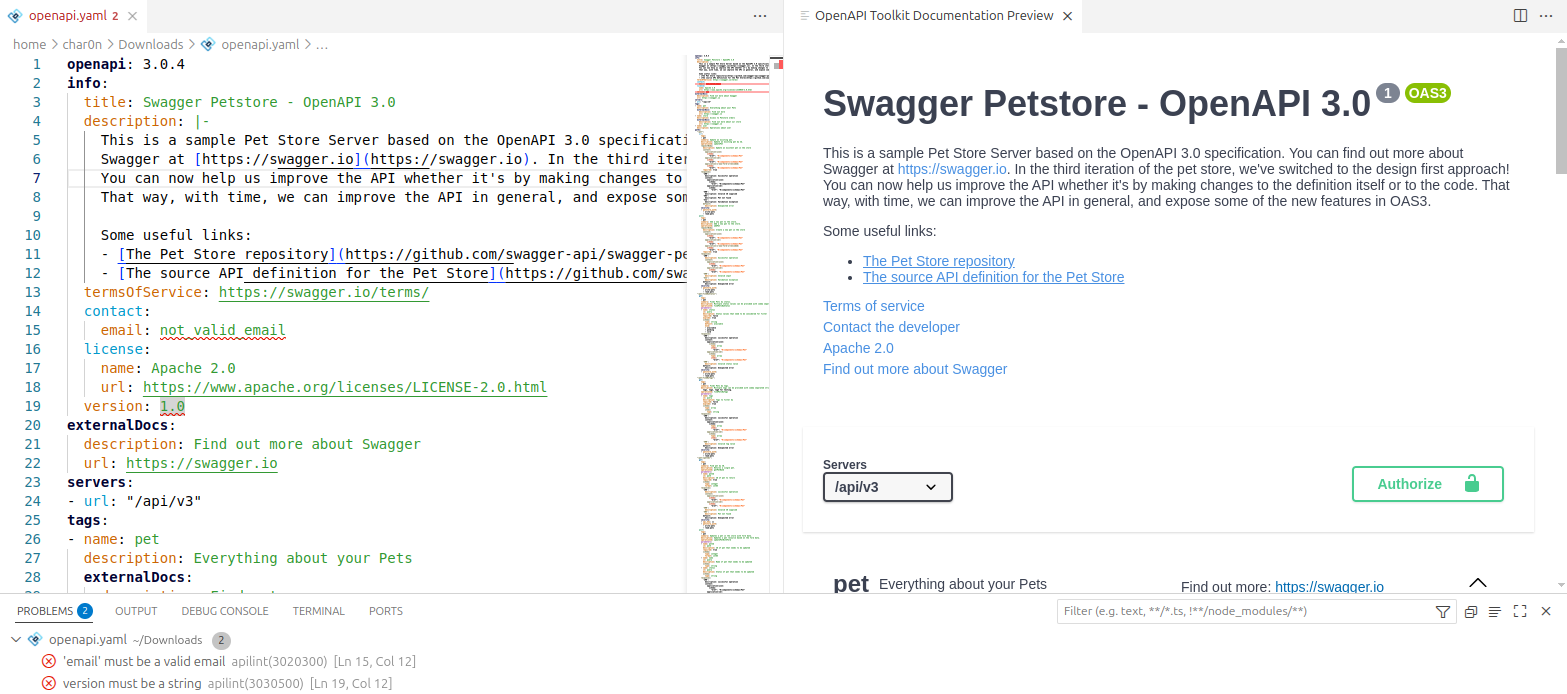
Works with OpenAPI specs in YAML (.yaml, .yml) and JSON (.json).
- Install the extension from the VS Code Marketplace (or Open VSX).
- Open an OpenAPI file.
- Open the Command Palette (
Ctrl+Shift+P) and run:- OpenAPI Toolkit: Show API Document Preview
- OpenAPI Toolkit: Format Document
- OpenAPI Toolkit: Convert to YAML / OpenAPI Toolkit: Convert to JSON
Choose the preview renderer in settings (Scalar or Swagger UI). See the documentation for configuration details: speclynx.com/openapi-toolkit.
- Hover documentation for OpenAPI keywords and schema elements (incl.
$reftargets) - Semantic autocompletion with inline docs and context-aware suggestions
$refsupport: completion + preview + navigation across files- Navigation & outline: Go to Definition / Find References + Document Symbols
- Live API docs preview inside VS Code
- Renderers: Scalar API Reference (default) or Swagger UI
- Interactive experience (auth, server selection, try-it / execute requests where supported)
- Format Document for OpenAPI YAML/JSON (respects VS Code formatting settings)
- Convert JSON ↔ YAML (creates a new file with the target extension)
- OpenAPI validation with editor diagnostics
- Modes (can be combined):
- JSON Schema validation
- Spectral validation/linting (custom rulesets)
- Semantic validation (deep checks beyond schema)
- Semantic linting (custom rules targeting semantic elements / JSONPath)
- Configure Spectral rulesets via workspace files or settings
- Configure SpecLynx semantic rules via workspace files or settings
- Optional command to select a ruleset file (see docs)
This extension supports the following OpenAPI versions:
Complete documentation (configuration, settings, commands, rulesets, troubleshooting, and examples) is available at speclynx.com/openapi-toolkit.
This extension does not collect telemetry.
Report bugs or request features on GitHub Issues.
Licensed under the Apache License 2.0. See LICENSE.


