Chat Session Manager (Chasm): Bridging the divide between AI providers
Harvest, harmonize, and recover your AI chat and agent task histories





Recover Sessions • Harvest & Export • Run & Record • Cross-Provider • Agency • Merge • Install
Chasm bridges the divide between AI providers by extracting and unifying chat sessions from AI coding assistants like GitHub Copilot, Cursor, and more. Never lose your AI conversations again.
- 🔄 Recover - Restore lost or orphaned chat sessions to VS Code
- 🔍 Harvest - Extract chat sessions from VS Code, Cursor, Windsurf, and other editors
- 🚀 Run & Record - Chat with Ollama, Claude, ChatGPT, Claude Code, or OpenCode — every message auto-saved
- 🔀 No Lock-in - Universal session format that works across all providers
- 🤖 Agentic Coding - Run coding tasks with any LLM backend (like Claude Code, but provider-agnostic)
- 🔗 Merge - Combine sessions across workspaces and time periods
- 📡 Real-time Recording - Live session recording to prevent data loss from editor crashes
- 🔌 API Server - REST + WebSocket API for building custom integrations
- 🗃️ Universal Database - SQLite-based storage that normalizes all providers
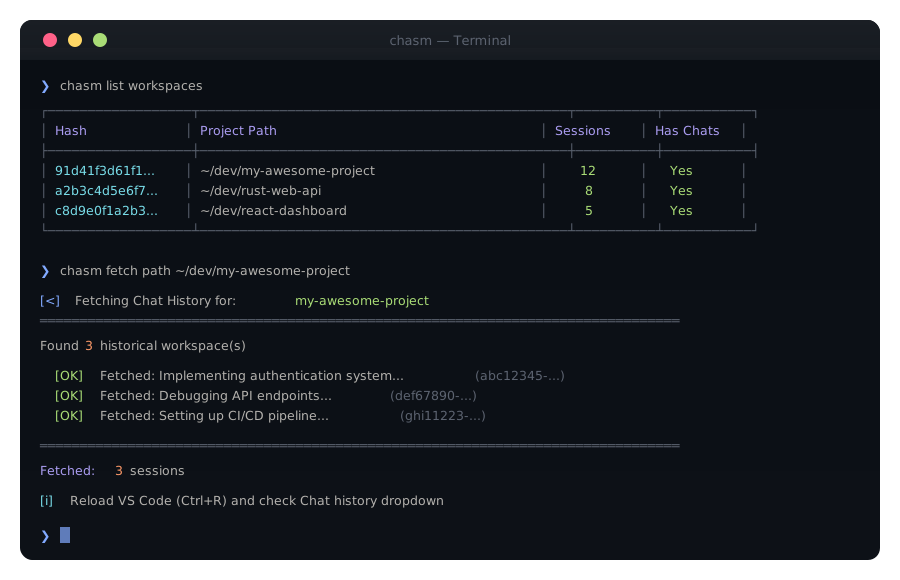
The #1 use case — recover chat sessions that disappeared from VS Code after an update, crash, or workspace change:
# Recover sessions for a specific project
chasm fetch path /path/to/your/project

# Example output:
# [<] Fetching Chat History for: my-project
# ======================================================================
# Found 3 historical workspace(s)
#
#    [OK] Fetched: Implementing authentication system... (abc12345-...)
#    [OK] Fetched: Debugging API endpoints... (def67890-...)
#
# ======================================================================
# Fetched: 2 sessions
#
# [i] Reload VS Code (Ctrl+R) and check Chat history dropdown
After running, reload VS Code (Ctrl+R or Cmd+R) and your sessions will appear in the Chat history dropdown.
# Scan for orphaned workspaces with recoverable sessions
chasm detect orphaned /path/to/your/project

# Automatically recover them
chasm detect orphaned --recover /path/to/your/project

# Register recovered sessions so VS Code sees them
chasm register all --force --path /path/to/your/project# See everything chasm knows about a workspace
chasm detect all /path/to/your/project --verbose
# Output shows:
# - Workspace ID and status
# - Available sessions
# - Detected providers
# - RecommendationsBulk-collect sessions from every provider on your machine into a single searchable database:
# Scan for all available providers and sessions
chasm harvest scan

# Harvest everything into a unified database
chasm harvest run

# Harvest only from specific providers
chasm harvest run --providers copilot

# Full-text search across ALL your AI conversations
chasm harvest search "authentication"
chasm harvest search "react component"

# Check database status
chasm harvest status# List all discovered workspaces
chasm list workspaces
# List sessions for a specific project
chasm list sessions --project-path /path/to/your/project
# Search by project name or content
chasm find session "my-project"
# View full session content
chasm show session <session-id># Export sessions from a project
chasm export path /backup/dir /path/to/your/project
# Batch export from multiple projects
chasm export batch /backup/dir /project1 /project2 /project3
# Sync between database and provider workspaces
chasm sync --pull # provider → database
chasm sync --push # database → provider
chasm sync --pull --push # bidirectionalLaunch any AI provider directly from the terminal — every message is automatically recorded to Chasm's database. No data loss, no manual exports, full history retention.
# Chat with a local Ollama model
chasm run ollama
chasm run ollama -m codellama
chasm run ollama -m mistral --endpoint http://remote-server:11434

# Chat with Claude (Anthropic API)
chasm run claude
chasm run claude -m claude-3-haiku

# Chat with ChatGPT (OpenAI API)
chasm run chatgpt
chasm run chatgpt -m gpt-4o-mini

# Launch Claude Code CLI with recording
chasm run claudecode --workspace /path/to/project

# Launch OpenCode CLI with recording
chasm run opencode --workspace /path/to/project

# Interactive TUI browser
chasm run tui
All sessions are automatically persisted to the database. Search them later:
chasm harvest search "the bug we fixed yesterday"
chasm list sessionsYour AI chat history is scattered across VS Code Copilot (SQLite + JSON), Cursor (proprietary format), ChatGPT (web-only), Claude (web-only), and local LLMs (various formats). Each uses different formats, storage locations, and APIs. If you switch providers, you lose context.
Chasm normalizes all sessions into a universal format so you can:
- Import from any provider into a unified database
- Export to any format (JSON, Markdown, CSV)
- Continue sessions with a different provider
- Search across all history regardless of source
# 1. Start a project with GitHub Copilot in VS Code
#    (sessions automatically tracked)

# 2. Later, recover and view your sessions
chasm fetch path /path/to/project
chasm list sessions --project-path /path/to/project

# 3. Export for portability
chasm export path ./backup /path/to/project

# 4. Continue with Claude, GPT-4, or local Ollama
chasm agency run -m claude-3 --context ./backup/session.json \
  "Review the code we wrote and suggest improvements"

# 5. Merge multiple sessions into one unified history
chasm merge path /path/to/project

# 6. Search across ALL your AI conversations
chasm harvest search "authentication implementation"{
"id": "uuid",
"title": "Session title",
"provider": "copilot|cursor|chatgpt|claude|ollama|...",
"workspace": "/path/to/project",
"created_at": "2026-01-08T12:00:00Z",
"messages": [
{
"role": "user|assistant|system",
"content": "Message text",
"timestamp": "2026-01-08T12:00:00Z",
"tool_calls": [],
"references": []
}
],
"metadata": {
"model": "gpt-4o",
"total_tokens": 15000,
"files_referenced": ["src/main.rs", "Cargo.toml"]
}
}| Feature | Vendor Lock-in | With Chasm |
|---|---|---|
| Switch providers | Lose all history | Keep everything |
| Search old chats | Per-provider only | Search all at once |
| Backup conversations | Manual exports | Automatic harvesting |
| Continue sessions | Start fresh | Full context preserved |
| Compare providers | Impossible | Same task, different models |
Chasm includes a full agentic coding toolkit similar to Claude Code, but provider-agnostic. Run coding tasks with any LLM backend.
# Simple coding task (single agent)
chasm agency run "Add error handling to main.rs"

# Specify a model
chasm agency run -m gpt-4o "Refactor this function to use async/await"

# Use local Ollama model
chasm agency run -m ollama/codellama "Write unit tests for lib.rs"

# Multi-agent swarm for complex tasks
chasm agency run --orchestration swarm "Build a REST API with authentication"

# Parallel agents for speed
chasm agency run --orchestration parallel "Analyze and fix all TODO comments"| Tool | Description |
|---|---|
file_read |
Read file contents |
file_write |
Write or modify files |
terminal |
Execute shell commands |
code_search |
Search codebase for symbols |
web_search |
Search the web for information |
http_request |
Make HTTP requests |
calculator |
Perform calculations |
| Mode | Description |
|---|---|
single |
Traditional single-agent (like Claude Code) |
sequential |
Agents execute one after another |
parallel |
Multiple agents work simultaneously |
swarm |
Coordinated multi-agent collaboration |
hierarchical |
Lead agent delegates to specialists |
debate |
Agents debate to find best solution |
- coordinator - Orchestrates multi-agent workflows
- coder - Writes and refactors code
- reviewer - Reviews code for issues
- tester - Generates and runs tests
- researcher - Gathers information
- executor - Runs commands and tasks
Over time, AI conversations scatter across workspaces, branches, and providers. Chasm's merge commands consolidate them into a coherent timeline:
# Merge all sessions for a project into a single session
chasm merge path /path/to/your/project

# Merge sessions from matching workspaces
chasm merge workspace "my-project*"

# Merge specific sessions by ID
chasm merge sessions <id1> <id2> <id3>

# Merge everything across all providers
chasm merge all
This is especially useful for:
- Long-running projects with dozens of scattered sessions
- Team handoffs where multiple developers chatted about the same codebase
- Context consolidation before starting a new coding task with full history
Start the REST API server for integration with web/mobile apps:
chasm api serve --host 0.0.0.0 --port 8787| Method | Endpoint | Description |
|---|---|---|
| GET | /api/health |
Health check |
| GET | /api/workspaces |
List workspaces |
| GET | /api/workspaces/:id |
Get workspace details |
| GET | /api/sessions |
List sessions |
| GET | /api/sessions/:id |
Get session with messages |
| GET | /api/sessions/search?q= |
Search sessions |
| GET | /api/stats |
Database statistics |
| GET | /api/providers |
List supported providers |
| POST | /api/recording/events |
Send real-time recording events |
| POST | /api/recording/snapshot |
Store full session snapshot |
| GET | /api/recording/sessions |
List active recording sessions |
| GET | /api/recording/sessions/:id |
Get recorded session by ID |
| GET | /api/recording/status |
Recording service status |
| WS | /api/recording/ws |
WebSocket for live session recording |
Chasm's recording API prevents data loss from editor crashes by capturing sessions as they happen. Extensions send incremental events and Chasm persists them in real-time.
Recording modes: Live (WebSocket), Batch (REST), Hybrid (WebSocket + REST checkpoints)
| Event | Description |
|---|---|
session_start |
Begin recording a new session |
session_end |
End a recording session |
message_add |
Add a new message (user, assistant, or system) |
message_update |
Update message content (streaming responses) |
message_append |
Append to message content (incremental chunks) |
heartbeat |
Keep session alive during idle periods |
- ✅ GitHub Copilot (VS Code)
- ✅ Cursor
- ✅ Windsurf
- ✅ Continue.dev
- ✅ Ollama
- ✅ LM Studio
- ✅ GPT4All
- ✅ LocalAI
- ✅ Jan.ai
- ✅ llama.cpp / llamafile
- ✅ vLLM
- ✅ Text Generation WebUI
- ✅ OpenAI / ChatGPT
- ✅ Anthropic / Claude
- ✅ Google / Gemini
- ✅ Azure AI Foundry
- ✅ Perplexity
- ✅ DeepSeek
cargo install chasm-cligit clone https://github.com/nervosys/chasm-cli.git
cd chasm-cli
cargo install --path .Download from GitHub Releases:
| Platform | Download |
|---|---|
| Windows x64 | chasm-v1.0.0-x86_64-pc-windows-msvc.zip |
| Windows ARM | chasm-v1.0.0-aarch64-pc-windows-msvc.zip |
| macOS x64 | chasm-v1.0.0-x86_64-apple-darwin.tar.gz |
| macOS ARM | chasm-v1.0.0-aarch64-apple-darwin.tar.gz |
| Linux x64 | chasm-v1.0.0-x86_64-unknown-linux-gnu.tar.gz |
| Linux musl | chasm-v1.0.0-x86_64-unknown-linux-musl.tar.gz |
| Platform | Location |
|---|---|
| Windows | %LOCALAPPDATA%\csm\csm.db |
| macOS | ~/Library/Application Support/csm/csm.db |
| Linux | ~/.local/share/csm/csm.db |
Click to expand full command reference
| Command | Description |
|---|---|
chasm fetch path <project-path> |
Recover sessions - Fetches and registers sessions for a project |
chasm fetch workspace <pattern> |
Fetch sessions from workspaces matching a pattern |
chasm fetch session <id> |
Fetch a specific session by ID |
chasm register all --path <path> |
Register all on-disk sessions into VS Code's database index |
| Command | Description |
|---|---|
chasm list workspaces |
List all discovered workspaces |
chasm list sessions |
List all sessions |
chasm list sessions --project-path <path> |
List sessions for a specific project |
chasm detect all <path> |
Auto-detect workspace, providers, and sessions |
chasm detect workspace <path> |
Detect workspace info for a path |
chasm detect providers |
List available LLM providers |
chasm detect orphaned <path> |
Find orphaned workspaces with recoverable sessions |
chasm detect orphaned --recover <path> |
Recover orphaned sessions to the active workspace |
| Command | Description |
|---|---|
chasm show session <id> |
Display full session content |
chasm find session <pattern> |
Search sessions by text pattern |
chasm find workspace <pattern> |
Search workspaces by name |
| Command | Description |
|---|---|
chasm export path <dest> <project-path> |
Export sessions from a project |
chasm export workspace <dest> <hash> |
Export sessions from a workspace |
chasm export batch <dest> <paths...> |
Batch export from multiple projects |
chasm import path <source> <project-path> |
Import sessions into a project workspace |
| Command | Description |
|---|---|
chasm merge path <project-path> |
Merge all sessions for a project into one |
chasm merge workspace <pattern> |
Merge sessions from matching workspaces |
chasm merge sessions <id1> <id2> ... |
Merge specific sessions by ID |
chasm merge all |
Merge all sessions across all providers |
| Command | Description |
|---|---|
chasm sync --pull |
Pull sessions from provider workspaces into database |
chasm sync --push |
Push sessions from database back to provider workspaces |
chasm sync --pull --push |
Bidirectional sync |
chasm sync --pull --workspace <pattern> |
Sync only matching workspaces |
chasm recover scan |
Scan for recoverable sessions from various sources |
chasm recover extract <path> |
Extract sessions from a VS Code workspace by project path |
chasm recover orphans |
List sessions that may be orphaned in workspaceStorage |
chasm recover repair |
Repair corrupted session files in place |
chasm recover convert |
Convert session files between JSON and JSONL formats |
chasm recover status |
Show recovery status and recommendations |
| Command | Description |
|---|---|
chasm harvest scan |
Scan for all available providers and sessions |
chasm harvest run |
Harvest sessions from all providers into database |
chasm harvest run --providers copilot |
Harvest only from specific providers |
chasm harvest status |
Show harvest database status |
chasm harvest search <query> |
Full-text search across all harvested sessions |
chasm harvest sync --push |
Alias for chasm sync --push |
chasm harvest sync --pull |
Alias for chasm sync --pull |
| Command | Description |
|---|---|
chasm run tui |
Launch interactive TUI browser |
chasm run ollama |
Chat with Ollama (auto-records session) |
chasm run ollama -m codellama |
Chat with a specific Ollama model |
chasm run claudecode |
Launch Claude Code CLI with recording |
chasm run opencode |
Launch OpenCode CLI with recording |
chasm run claude |
Chat with Claude API (auto-records session) |
chasm run claude -m claude-3-haiku |
Chat with a specific Claude model |
chasm run chatgpt |
Chat with ChatGPT API (auto-records session) |
chasm run chatgpt -m gpt-4o-mini |
Chat with a specific ChatGPT model |
| Command | Description |
|---|---|
chasm git init |
Initialize git versioning for chat sessions |
chasm git add |
Stage and commit chat sessions |
chasm git status |
Show git status of chat sessions |
chasm git log |
Show history of chat session commits |
chasm git snapshot |
Create a tagged snapshot |
| Command | Description |
|---|---|
chasm provider list |
List discovered LLM providers |
| Command | Description |
|---|---|
chasm api serve |
Start the REST API server |
chasm api serve --port 8787 |
Start on specific port |
| Command | Description |
|---|---|
chasm telemetry |
Show current telemetry status |
chasm telemetry on |
Enable anonymous usage data collection |
chasm telemetry off |
Disable telemetry (opt-in by default) |
- Rust 1.85+
- Git
git clone https://github.com/nervosys/chasm-cli.git
cd chasm-cli
cargo build --releasecargo testThis project is dual-licensed:
- Open Source: GNU Affero General Public License v3.0 — free for open-source use. If you modify Chasm and deploy it on a network, you must make the source available.
- Commercial: A proprietary license is available for companies that need to use Chasm without AGPL obligations. See COMMERCIAL_LICENSE.md for details or contact licensing@nervosys.ai.
Contributions are welcome! By contributing, you agree that your contributions may be used under both licenses. Please read our Contributing Guide and Code of Conduct.
For security issues, please see our Security Policy.
Chasm underwent a comprehensive security audit in January 2026 against industry frameworks:
| Framework | Status | Notes |
|---|---|---|
| CVE/RustSec | ✅ Pass | No direct vulnerabilities |
| MITRE ATT&CK | ✅ Mitigated | Command execution requires auth |
| NIST FIPS | ✅ Compliant | Argon2id password hashing |
| CMMC 2.0 | ✅ Compliant | Authentication hardened |
Key Security Features:
- 🔐 Argon2id password hashing (OWASP recommended)
- 🔑 JWT authentication with required secrets (no dev fallbacks)
- 🛡️ Parameterized SQL queries (no injection vectors)
- 🔒 DPAPI/Keychain integration for credential access
Dependencies: 2 transitive advisories from ratatui TUI framework (paste unmaintained, lru unsound iterator) - compile-time/TUI only, no runtime security risk.
Built with Rust 🦀 by NERVOSYS