These libraries support LCM1602A-14 LCD module I2C and SPI communication with NodeMCU ESP8266, official Arduino and Maker (Cytron Product).
These libraries were built just in fundamental function. So, there a lot of features that we can update together! You are encouraged to improve the code for your purposed and better application by pulling request from me or modify by yourself. Cheers!
UPDATE 1.0
two features added; scroll left to right; scroll right to left
Modify the print structure
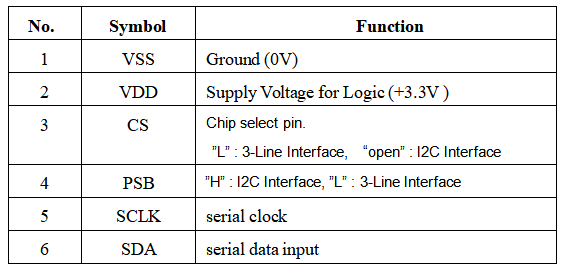
The library file must be downloaded and saved inside Arduino library file before uploading user's code
STEP 1 : Download the library file (Arduino_LCD-I2C_Library and Arduino_LCD-SPI_Library)

STEP 2 : Put the downloaded files in Arduino library folder separately [Documents > Arduino > libraries]

STEP 3 : Check both files if its already got into the libraries by opening the Arduino IDE then got to sketch [Arduino IDE > sketch > Include Library]

If the libraries are there, then you are ready to use it but if the libraries does not appear, you need to restart Arduino IDE by closing the IDE and open back.
- Import lcd_i2c library
#include <lcd_i2c.h>
- Import lcd_spi library
#include <lcd_spi.h>
- Create object using class
- Set the communication address, setup the columns and rows required for LCD
- The I2C communication for this LCD is 0x3e (HEX) or 62 (DEC), 16 is the number of the columns, 2 is the number of the rows
lcd_i2c lcd(0x3E,16,2);
- Create object using class
- Set the Chip Selected Pin
- D8 for NodeMCU V3 ESP8266, 10 for any Arduino and Maker
lcd_spi lcd(D8);
- LCD intiallization function
- For SPI need to initialize the column and row here, (16,2)
lcd.begin();
- Set the cursor to a specific position
- First parameter sets to the column, second parameter set the row
- Set the cursor to column 0 (first column) and row 0 (first row)
lcd.setCursor(0,0);
- Function to move the text by scrolling from left to right.
lcd.scrollDisplayRight();
- Function to move the text by scrolling from right to left.
lcd.scrollDisplayLeft();
- Write string to the LCD
lcd.print("Hello World");
- Clear the data on the display
lcd.clear();