




Warning
g0efilter is in active development and its configuration may change often.
g0efilter is a lightweight container designed to filter outbound (egress) traffic from attached container workloads. Run g0efilter alongside your workloads and attach them to share its network namespace to enforce a simple IP and domain allowlist policy.
As a self-hoster running many open source apps, I wanted an easy way to restrict outbound connections from containers, as not all can be trusted. While Docker supports internal-only networks, some containers do need selective network and internet access. I wanted to support wildcard subdomains (e.g. *.example.com) without terminating TLS connections or relying on IP allowlisting alone, as CDNs can have multiple changing IPs and many subdomains. This could probably be achieved with third-party firewall products, but I wanted an open source, lightweight filter that runs alongside Docker Compose workloads...so here we are.
- Egress filtering - Explicitly allow specified IPs/CIDRs and domains in a policy file; anything not on the allowlist is blocked
- Wildcard subdomain support - Allow wildcard subdomains like
*.example.comto match any subdomain level - Two filtering modes - HTTPS (TLS SNI/HTTP Host inspection) or DNS-based filtering
- Live policy reloading - Update policy.yaml without restarting containers
- Real-time dashboard - Web UI with SSE streaming for traffic monitoring
- Remote unblock - Unblock domains/IPs from the dashboard UI (with auth middleware)
- Notifications - Gotify alerts for blocked traffic events
Refer to the examples.
Attach containers to g0efilter by setting network_mode: "service:g0efilter" in Docker Compose, which shares g0efilter's network namespace (network stack) with those containers. Traffic from attached containers is filtered based on a policy file that defines allowlisted IPs/CIDRs and domains.
Traffic to allowlisted IPs/CIDRs bypasses all filtering and passes through directly.
Traffic to other IPs is subject to domain-level filtering based on the FILTER_MODE environment variable (https or dns):
-
HTTPS mode (default): Outbound HTTP/HTTPS traffic on ports 80/443 is intercepted and redirected to local services running inside g0efilter. These services inspect plain text packet data, including the HTTP
Hostheader (for HTTP) or TLS SNI from the TLS Client Hello (for HTTPS, without terminating the connection), and cross-reference it against the allowlist. If the domain is allowed, the connection is established and traffic flows through (the service acts as a middleman). If not found in the allowlist, the connection is reset and traffic is blocked. -
DNS mode: DNS queries are intercepted and redirected to an internal DNS server. The server only resolves allowlisted domains and non-allowlisted queries receive NXDOMAIN responses. Note that direct IP connections bypass DNS filtering entirely.
Filter Logic Flow (HTTPS mode):
Start
│
├─► Is destination IP in allowlist? ── Yes ─► ALLOW (skip remaining steps, no redirect)
│                                   └─ No ─► continue
│
├─► Is connection already established? ── Yes ─► ALLOW (skip remaining steps, no redirect)
│                                      └─ No ─► continue
│
├─► Is destination port 80 or 443? ── No ─► BLOCK
│                                  └─ Yes ─► continue
│
├─► Redirect to local filter service (port 8080 for HTTP, 8443 for HTTPS)
│
├─► Extract domain from Host header (HTTP) or SNI (TLS)
│
├─► Does domain match allowlist? ── Yes ─► FORWARD to original destination
│                                └─ No ─► DROP
│
└─► LOG decision → Send to dashboard (if enabled) ─► End
Note
Attached containers share g0efilter's network namespace and must not bind to ports used by g0efilter.
By default, g0efilter uses HTTP_PORT (8080), HTTPS_PORT (8443), and optionally DNS_PORT (53).
The optional g0efilter-dashboard container runs a web UI on port 8081 (by default). If DASHBOARD_HOST and DASHBOARD_API_KEY are set, g0efilter will ship logs to the dashboard.
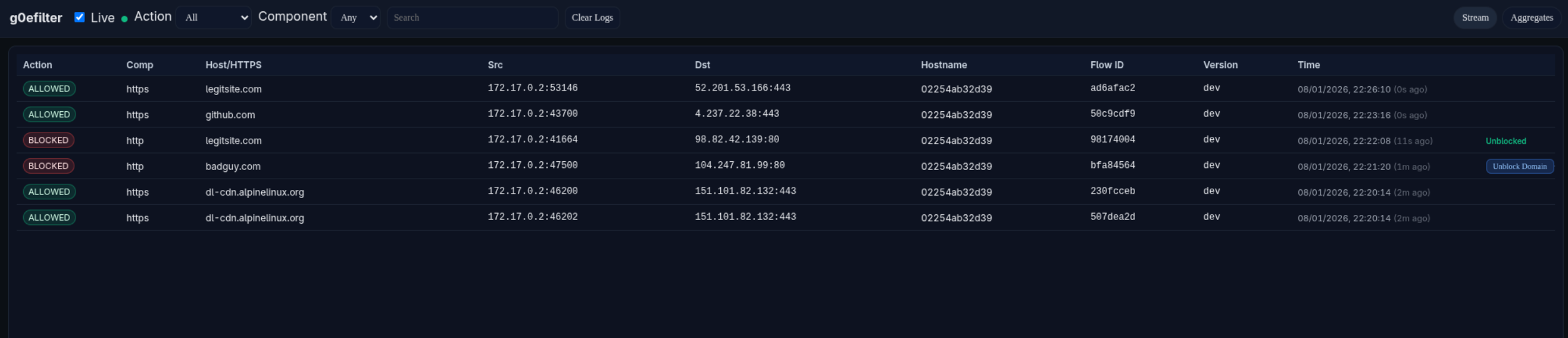
Example Dashboard Screenshot:
allowlist:
  ips:
    - "1.1.1.1"
    - "192.168.0.0/16"
    - "10.1.1.1"
  domains:
    - "github.com"
    - "*.alpinelinux.org"
Note
- The policy file supports live reloading: edits to policy.yaml automatically trigger rule and service updates without needing to restart the container. The internal g0efilter services are restarted, but the container itself remains running.
- If you do not need live reloading, you can use environment variables (ALLOWLIST_IPS, ALLOWLIST_DOMAINS) instead of a policy file. If both are present, environment variables take precedence.
| Variable | Description | Default |
|---|---|---|
LOG_LEVEL |
Log level (TRACE, DEBUG, INFO, WARN, ERROR) | INFO |
HOSTNAME |
To identify which endpoint is sending the logs | unset |
HTTP_PORT |
Local HTTP port | 8080 |
HTTPS_PORT |
Local HTTPS port | 8443 |
POLICY_PATH |
Path to policy file inside container | /app/policy.yaml |
ALLOWLIST_IPS |
Comma-separated list of allowed IPs/CIDRs (takes precedence over policy file) | unset |
ALLOWLIST_DOMAINS |
Comma-separated list of allowed domains (takes precedence over policy file, supports wildcards like *.example.com) |
unset |
FILTER_MODE |
https (TLS SNI/HTTP Host) or dns (DNS name filtering) |
https |
DNS_PORT |
DNS listen port | 53 |
DNS_UPSTREAMS |
Upstream DNS servers (comma-separated). Uses Docker's default DNS if not specified | 127.0.0.11:53 |
DASHBOARD_HOST |
Dashboard URL for log shipping | unset |
DASHBOARD_API_KEY |
API key for dashboard authentication | unset |
DASHBOARD_QUEUE_SIZE |
Queue size for buffering logs before sending to dashboard. Logs are dropped if queue is full | 1024 |
DASHBOARD_START_DELAY |
Delay before starting dashboard log shipping (supports duration formats like 5s, 1m) |
5s |
LOG_FILE |
Optional path for persistent log file | unset |
NFLOG_BUFSIZE |
Netfilter log buffer size | 96 |
NFLOG_QTHRESH |
Netfilter log queue threshold | 50 |
NOTIFICATION_HOST |
Gotify server URL for security alert notifications | unset |
NOTIFICATION_KEY |
Gotify application key for authentication | unset |
NOTIFICATION_BACKOFF_SECONDS |
Rate limit backoff period for duplicate alerts (in seconds) | 60 |
NOTIFICATION_IGNORE_DOMAINS |
Comma-separated list of domains to ignore for notifications (supports wildcards like *.example.com) |
unset |
ENABLE_REMOTE_UNBLOCK |
Enable polling dashboard for remote unblock requests | false |
UNBLOCK_POLL_INTERVAL |
How often to poll dashboard for unblock requests (supports duration formats like 10s, 1m) |
10s |
| Variable | Description | Default |
|---|---|---|
PORT |
Address/port the dashboard listens on (HTTP UI + API). Can be just a port (8081) or address+port (:8081) |
:8081 |
API_KEY |
API key used to authenticate incoming log data from the g0efilter container. Must match DASHBOARD_API_KEY |
unset |
LOG_LEVEL |
Log level (TRACE, DEBUG, INFO, WARN, ERROR) | INFO |
BUFFER_SIZE |
In-memory buffer size for events. Controls how many events can be queued before dropping | 5000 |
READ_LIMIT |
Maximum number of events returned per read/API request | 500 |
SSE_RETRY_MS |
Server-Sent Events (SSE) client retry interval in milliseconds | 2000 |
WRITE_TIMEOUT |
HTTP write timeout in seconds (0 = no timeout, recommended for SSE) | 0 |
RATE_RPS |
Maximum average requests per second (rate-limit) | 50 |
RATE_BURST |
Maximum burst size for rate-limiting (in requests) | 100 |
The remote unblock feature allows administrators to unblock domains or IPs directly from the dashboard UI. When enabled, g0efilter instances poll the dashboard for pending unblock requests and automatically update their policy files.
Warning
This feature is disabled by default (ENABLE_REMOTE_UNBLOCK=false). Do not enable this in non-test environments without proper authentication middleware protecting the dashboard. The POST /api/v1/unblocks endpoint must be protected by reverse proxy authentication (e.g., Authelia, Authentik, PocketID) to prevent unauthorized users from modifying your allowlist.
I would recommend to place the g0efilter-dashboard behind a reverse proxy such as Traefik with the following controls:
| Endpoint | Auth | Description |
|---|---|---|
GET /health |
None | Health check for monitoring/load balancers |
POST /api/v1/logs |
API Key | Log ingestion from g0efilter containers |
GET /api/v1/unblocks?hostname=X |
API Key | Poll pending unblock requests (used by g0efilter) |
POST /api/v1/unblocks/ack |
API Key | Acknowledge processed unblock (used by g0efilter) |
GET / |
Middleware | Dashboard web UI |
GET /api/v1/logs |
Middleware | Read logs |
GET /api/v1/events |
Middleware | Server-Sent Events stream |
DELETE /api/v1/logs |
Middleware | Clear logs |
POST /api/v1/unblocks |
Middleware | Create unblock request (from dashboard UI) |
GET /api/v1/unblocks/status |
Middleware | Poll unblock status (from dashboard UI) |
If using Traefik as a reverse proxy, here's an example of a working yaml based configuration using two routers to handle different authentication requirements:
http:
  routers:
    g0efilter-ingest-router:
      entryPoints:
        - websecure
      rule: "Host(`g0efilter.example.com`) && ((PathPrefix(`/api/v1/logs`) && Method(`POST`)) || PathPrefix(`/health`) || (Path(`/api/v1/unblocks`) && Method(`GET`) && QueryRegexp(`hostname`, `^.+$`)) || (Path(`/api/v1/unblocks/ack`) && Method(`POST`)))"
      service: g0efilter-dash-service
      middlewares:
        - security-headers
        - ratelimit
      tls:
        certResolver: letsencrypt
        domains:
          - main: "example.com"
            sans:
              - "*.example.com"

    g0efilter-dash-router:
      entryPoints:
        - websecure
      rule: "Host(`g0efilter.example.com`)"
      service: g0efilter-dash-service
      middlewares:
        - security-headers
        - ratelimit
        - auth-oidc  # Your auth middleware
      tls:
        certResolver: letsencrypt
        domains:
          - main: "example.com"
            sans:
              - "*.example.com"

  services:
    g0efilter-dash-service:
      loadBalancer:
        servers:
          - url: "http://g0efilter-dashboard:8081"
How it works:
g0efilter-ingest-router: MatchesPOST /api/v1/logs,/health,GET /api/v1/unblocks?hostname=X, andPOST /api/v1/unblocks/ack- no SSO required (API key auth)g0efilter-dash-router: Matches all other requests to the dashboard - requires SSO/OIDC authentication- The more specific ingest router rule takes precedence for API calls and health checks
- All other traffic (UI, reads, etc.) goes through the dashboard router with SSO protection
services:
  g0efilter:
    image: docker.io/g0lab/g0efilter:latest
    container_name: g0efilter
    volumes:
      - ./policy.yaml:/app/policy.yaml
    cap_drop:
      - ALL
    cap_add:
      - NET_ADMIN # Required for nftables modification
    security_opt:
      - no-new-privileges
    # Host-exposed port for dashboard (dashboard runs in same netns)
    ports:
      - 8081:8081 # Dashboard port
    read_only: true
    restart: always
    env_file:
      - .env

  g0efilter-dashboard:
    image: docker.io/g0lab/g0efilter-dashboard:latest
    container_name: g0efilter-dashboard
    # optional - custom user
    # user: 1000:1000
    cap_drop:
      - ALL
    security_opt:
      - no-new-privileges
    read_only: true
    env_file:
      - .env.dashboard
    network_mode: "service:g0efilter"
    restart: always

  example-container:
    image: docker.io/alpine/curl:latest
    command: sh -c "sleep infinity"
network_mode: "service:g0efilter"The g0efilter container images are signed with Cosign using keyless signing:
# Verify g0efilter container
cosign verify g0lab/g0efilter:latest \
  --certificate-identity-regexp=https://github.com/g0lab/g0efilter \
  --certificate-oidc-issuer=https://token.actions.githubusercontent.com \
  -o text

# Verify g0efilter-dashboard container
cosign verify g0lab/g0efilter-dashboard:latest \
  --certificate-identity-regexp=https://github.com/g0lab/g0efilter \
  --certificate-oidc-issuer=https://token.actions.githubusercontent.com \
-o textThis project is licensed under the MIT License - see the LICENSE file for details.