
This project is an interactive physics simulator which primarily focuses on simulating the interaction between concave meshes (such as a bottle) and a body of water in real-time. Where necessary, it sacrifices accuracy for performance and/or aesthetics.
It features a position-based 3D physics engine written from scratch, which supports arbitrary concave meshes by computing their inertia tensor. To simulate the water, we implement a height field fluid simulation with adaptive time-stepping, and carefully couple forces between it and the physics engine. To ensure that our simulation updates do not block our rendering and vice-versa, the project features robust multithreading. The entire scene is then rasterised by OpenGL (we use version 3.3 for compatibility).
To allow the user to easily simulate a large variety of scenes, the project features a JSON loader that can load scene objects. See the How to Use This? section below for more.
For more details, kindly see the technical report as well as the extensive code documentation available via doxygen.
Documentation should be generated in the docs/compiled/ folder when the project is compiled, provided doxygen is available.
See
Videos are available on YouTube.videos/ for videos that demo the various objectives listed at the bottom of this file.
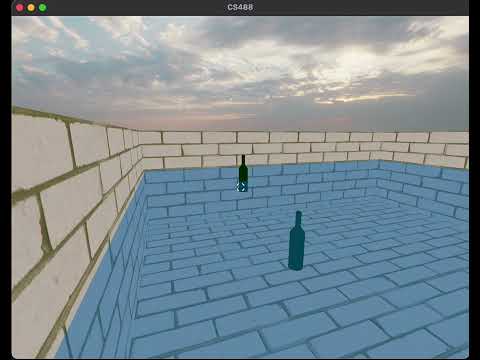
The following demo shows off buoyancy of a light and dense bottle,
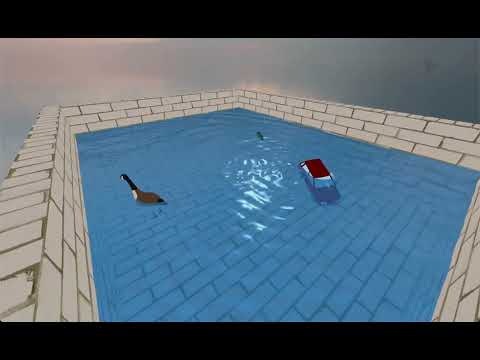
and the following is a general showcase of the project,

CMake gave us a lot of problems throughout development. If something does not work, please contact us!
When the repo is first pulled down, you must pull down the relevant git submodules of dependency libraries. To do so, execute,
git submodule update --init --recursiveSkip the first step if you have already built the project once and have not added/removed source or header files nor edited cmake build files. In this instance, you don't need new build files.
If you have not built the project yet, or if you add/remove source or header files, first run,
# for windows
cmake --preset windows-debug   # for debug mode
cmake --preset windows-release # for release mode

# for everyone else
cmake --preset debug   # for debug mode
cmake --preset release # for release mode
This generates the actual build files for your compilation setup.
IMPORTANT NOTE:
Your default compiler may not support C++20 fully!
This can lead to strange circumstances where, e.g, you cannot find std::format during compilation.
If you are on the Linux student server, then this is most likely the case.
Please supply a C++ compiler that can support C++20 via the command below
cmake -DCMAKE_CXX_COMPILER=/path/to/compiler --preset <your_preset>Then to actually build the project run,
# for windows
cmake --build --preset windows-debug -j 8   # for debug build
cmake --build --preset windows-release -j 8 # for release build

# for everyone else
cmake --build --preset debug -j 8   # for debug build
cmake --build --preset release -j 8 # for release buildOnce built run the CS488 executable to launch the program.
For Windows, the executable should be build/windows-debug/Debug/CS488.exe or build/windows-release/Release/CS488.exe or maybe even in build/windows-debug/CS488.exe or build/windows-release/CS488.exe.
Please make sure to run from the build directory to ensure assets and shaders are found correctly.
Otherwise, the executable should be build/debug/CS488 or build/release/CS488.
By default, the executable runs and displays the default scene, which is just a grid of water with an initial hump in the centre.
To load other scenes, pass the --scene /path/to/scene.json flag at launch.
The directory scenes/ includes a few that show off various objectives.
When the simulator starts up, the physics and water simulation is by default paused. This means that physics bodies do not spawn in/out, and they, along with the water and particle effects, stay static.
Pressing the p key unpauses the simulation.
This also causes your crosshair to appear in the centre of your screen.
Pressing it again switch back to the pause state.
To debug draw bounding boxes around physics objects, as well as around point lights which are otherwise untextured, press the k key.
Pressing it again will go back to hiding them.
To look/move around, first left-click into the simulator.
Then the mouse can be used to look around.
Also once clicked in, you can move the camera with Minecraft controlls.
That is, W, A, S, and D keys move the camera in the x-z plane only.
And the space/shift keys move the camera up and down respectively.
Press escape to click out of the simulator and free up your mouse.
When clicked in with the simulator unpaused, left-click will throw a bottle in the direction you are looking with some random spin and speed. Please note that physics objects are despawned if they fall too low, and if they are too near the pool walls on the outside, they may be snapped into the pool if the water is enabled (this is to prevent objects in the water from falling past the edge and works well if they are in the pool to begin with).
Scene files are JSON documents that define the complete setup for a physics simulation, including objects, lighting, and water configuration. The scene loader supports both physics-enabled objects and static geometry: rendered with a flat texture shader, lighting shader, or a sun shader.
The schema is defined as
{
  "physicsObjects": [...],
  "staticObjects": [...],
  "pointLights": [...],
  "waterEnabled": true/false,
  "waterInitialHumpSize": 0.4
}
Physics objects participate in rigid body simulation with collision detection and fluid interaction.
- Required Fields:
modelPath: Path to .obj model file (string)scale: Uniform scale (number) or per-axis scale ([x, y, z])initPos: Initial position[x, y, z](array of 3 numbers)initVel: Initial velocity[x, y, z](array of 3 numbers)initAngVel: Initial angular velocity[x, y, z](array of 3 numbers)density: Object density in kg/m³ (number, must be > 0)
- Optional Fields:
shader: Shader type - "flat", "light", or "sun" (default: "flat")name: Display name for debugging (default: "Unnamed Physics Object")
Static objects are rendered but don't participate in physics simulation.
- Required Fields:
modelPath: Path to .obj model file (string)scale: Uniform scale (number) or per-axis scale ([x, y, z])position: World position[x, y, z](array of 3 numbers)shader: Shader type - "flat", "light", or "sun" (string)
- Optional Fields:
rotation: Euler angles in degrees[x, y, z](default:[0, 0, 0])name: Display name for debugging (default: "Unnamed Static Object")
Up to 4 point lights are supported for scene illumination.
-
Required Fields:
position: Light position[x, y, z](array of 3 numbers)
-
Optional Fields :
ambientColour:[0.1, 0.1, 0.1]- Base illumination RGBdiffuseColour:[0.5, 0.5, 0.5]- Main light colour RGBspecularColour:[0.5, 0.5, 0.5]- Highlight colour RGBconstantFalloff: 1.0 - Constant attenuation termlinearFalloff: 0.35 - Linear attenuation termquadraticFalloff: 0.44 - Quadratic attenuation term
Note that colour values should be in range [0.0, 1.0]. Falloff values must be non-negative.
Controls the shallow water simulation system.
waterEnabled: Enable/disable water simulation (boolean, default: true)waterInitialHumpSize: Initial wave height (float, default: 0.4)
flat: No lighting calculations, uniform colorlight: Blinn-Phong shading with diffuse and specular componentssun: Enhanced lighting suitable for primary objects
We recommend the following:
- Use
flatshader for pools and background geometry - Use
sunshader for primary physics objects when water is enabled
- Model files must exist at specified paths
- Scale values must be positive for all objects
- Density must be positive for physics objects
- Color values must be non-negative
- Maximum 4 point lights per scene
- All required fields must be present
Nearly all the implementation details are available in the technical report or the code documentation.
See the documentation and technical report.
The project has been tested on Mac OS 14.5 running on an M1 macbook, compiled with clang, and performs best there. It has also been tested on windows 11, compiled with MSVC. It has not been tested on Linux, although it should work there as well.
Configurability has been specified in the sections above.
Specified in the sections above.
We would like to acknowledge that we relied upon the sources that have been mentioned in the code documentation, as well as the technical report. In addition to those sources, we would like to give credit
- The models of the goose and car were taken from a source online: Goose by Poly by Google CC-BY via Poly Pizza. We modified the
.mtlfiles to adapt it to our renderer. - The brick texture used by the pool and the teapot was taken from the the
.mtlfile bundled with the Utah Teapot available from the Computer Graphics department at the University of Utah. - The skybox we use is a colour modified version of a sky-only version of Citrus Orchard by Dimitrios Savva and Jarod Guest, licensed under CC0 (essentially creative commons). Avaialble at https://polyhaven.com/a/citrus_orchard_puresky.
- The container texture was provided by
learnopengl.com - Cornellbox was taken from the assignment
- We use the following open source libraries
glewglfwlinalgby Sterling Orstenstb_image
Certain sections of code might be, at times, inspired by techniques or ideas from other sources. We have tried to the best of our ability to cite such sources in the documentation and apologise if any were missed by accident.
Detailed in the technical report and the documentation.
This is not meant to be a realistic physics simulator. It is meant to be fun to look at. Where necessary, we sacrifice accuracy for performance and/or aesthetics.
No geese were harmed in the making of this project. We cannot say anything about the bottles however...
All of the following were achieved:
- Replace CPU rasterisation with OpenGL rasterisation pipeline. Write vertex and fragment shaders to implement MVP matrix, diffuse and specular texture maps, and Phong shading.
- Model the objects required for the scene, such as the bottle.
- Simulate 2D shallow water as a height field by integrating height and velocity as described in the technical outline.
- Solve advection equations and add boundary conditions to simulate the waves accurately as described in the technical outline.
- Implement a geometry shader to rasterise the surface of the water such that it appears continuous as described in the technical outline.
- Implement rigid-body physics for the bottle using Verlet integration. Handle collisions with the pool and other objects with bounding boxes as described in the technical outline.
- Simulate change in water levels and waves when objects collide as described in the technical outline.
- Implement fluid-body interaction (buoyancy and drag) as described in the technical outline.
The following tasks, which took effort significant enough for them to have been an objective themselves, were also completed:
- Improve performance by running the simulation, logger, and renderer on separate threads.
- Decouple the rate of the simulation and the rate of rendering by use of a non-blocking, lock-free, triple-buffer channel, often seen in similar real-time systems, for memory-efficient communication between threads. This allows the simulation and render threads to never block each other.
- Compute the inertia tensor for arbitrary convex meshes. Add realistic rotational dynamics, torque and gyroscopic effect for physics objects.
- Implement a JSON scene loader to allow the user to configure a variety of scenes, and make the renderer somewhat general-purpose.
- Add a sky map, and add cube map reflections, along with specular highlights, to the water surface.
- Add interactivity: looking, movement, throwing bottles, pausing/unpausing the simulation. Also adding a heads-up display for crosshair and play/pause icon.
- Documentation: document important sections of the code base with
doxygen. - Simple particles: Add simple randomised particles when objects splash in water whose strength is based on the size of the splash. Note that they have minimal collision.
- Add support for up to 4 point lights. Very basic support for blinn-phong point lights.
- Object and material loader that loads most
.objfiles and includes support for most standard.mtlfiles, along with support for diffuse and specular maps. (Note that the diffuse and specular maps are multiplied by the coefficient values in the.mtlfiles which may not be expected by some authors). - Add a simple spatial grid to improve the performance of the collision broad phase check.
- Use quaternions to represent the stored state of all rotations, prevent gimbal lock and other issues.
There is a lot more on our wishlist of features. We would love to achieve the other extra objectives as stated in the final proposal, as well as add support for saving/reloading the simulator's state. And maybe even add support for compilation to web.
Water Physics with Rigid Bodies. (Formerly Bottles & Water.)
Palaksha Drolia, Awab Qureshi.
pdrolia, a9quresh.